Bedside Testing: Gold Audio Task
What this page tells you
Run the Gold tones task in the EMU research room on the TNL-Macbook using ReportPredict_uPenn_Final_v2.py in PsychoPy2 with Subject ID = RID; plug the sync cable into DC1/DC7 and annotate START/END TONES TASK. Then upload the csv and taskData files to the PennBox HUP###/Session1 folder.
Credential removed
A password that appeared in the original text has been removed. Get it from the lab password manager, never from a wiki page.
In the EMU epilepsy research room...
- Get the laptop from the drawer; the key for the drawer is hanging on the black rack by the TV
- Turn the laptop on
- Make sure the laptop is charged before you go in to test the patient
- Laptop Username: TNL-Macbook
- Laptop Password: (in the password manager)
- (You do not need wifi on)
- Task bar: PsychoPy2 (or filepath: Applications → PsychoPy_1_83_04)
- Task name: ReportPredict_uPenn_Final_v2.py (make sure it is version 2 !!)
- Data output pathway: MATLAB/Goldlab_TonesTask/ToneTask/Psychopy/data
- To run experiment run ReportPredict_uPenn_Final_v2.py in PsychoPy2
- Click green play button on the top of the screen.
- ReportPredict Task pop up will display.
- Enter patient data:
- Subject ID = RID
- Session # = 1 This corresponds to how many times they are trying the last. If you have to come back to finish on a different day, it should be labeled session 2.
- do this when in the room with the patient, as the task will start after putting in this data
- In the room:
- plug in the black cord to the natus box port that says DC1/DC7 and plug the other side into the computer
- write START TONES TASK on eeg monitor when the task is beginning, and END TONES TASK when finished so that we can clip it
- the task will take about 15-20 min to complete
After you run the task, follow these steps to share the data
In this pennbox folder:
- Make a HUP### folder
- Put the de-identified implant powerpoint you get from the EMU techs in this folder (named RIDXXX_HUPXXX)
-
Within the HUP### folder, make a folder called "Session1"
- In this folder, you will put the 2 .csv files and the taskData file from the EMU computer (should look like this)
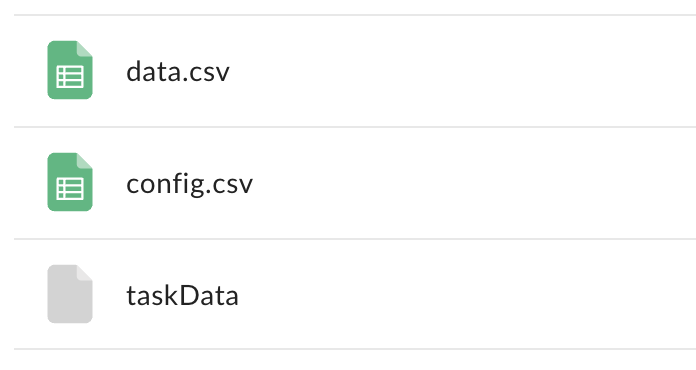
- In this folder, you will put the 2 .csv files and the taskData file from the EMU computer (should look like this)
-
-
- Path in EMU computer to find files:
* Correct path: MATLAB/Goldlab_TonesTask/ToneTask/Psychpy/V2/data/RID####/
* might also end up in this folder: MATLAB/Goldlab_TonesTask/ToneTask/Psychpy/data/RID####
**make sure parameters is set for: ['options_sendSYNC'] params = True
- Path in EMU computer to find files:
-
-
any patient you don't get the config.csv for, add to list of incomplete data: