Mounting cnt-fs
What this page tells you
In the VDI, open File Explorer and click CNT under This PC. If missing, map network drive Z: to \pmacs.upenn.edu\depts\NE-4322-Neurology\CNT (or \172.16.50.149\CNT) using different credentials, username pmacs\pennkey.
pmacs\Mounting cnt-fs:
- Log into VDI
- Search up file explorer
- Go to “This PC”
- You should see the CNT server there
- Click on CNT
-
If CNT is not there, then you have to remount it:
- Right-click on Network
- Select “Map Network Drive
- In Drive, select Z:
-
In Folder, type in this pathway:
\\pmacs.upenn.edu\depts\NE-4322-Neurology\CNT
OR
\\172.16.50.149\CNT -
Be sure to check "Connect using different credentials"
- Hit Finish
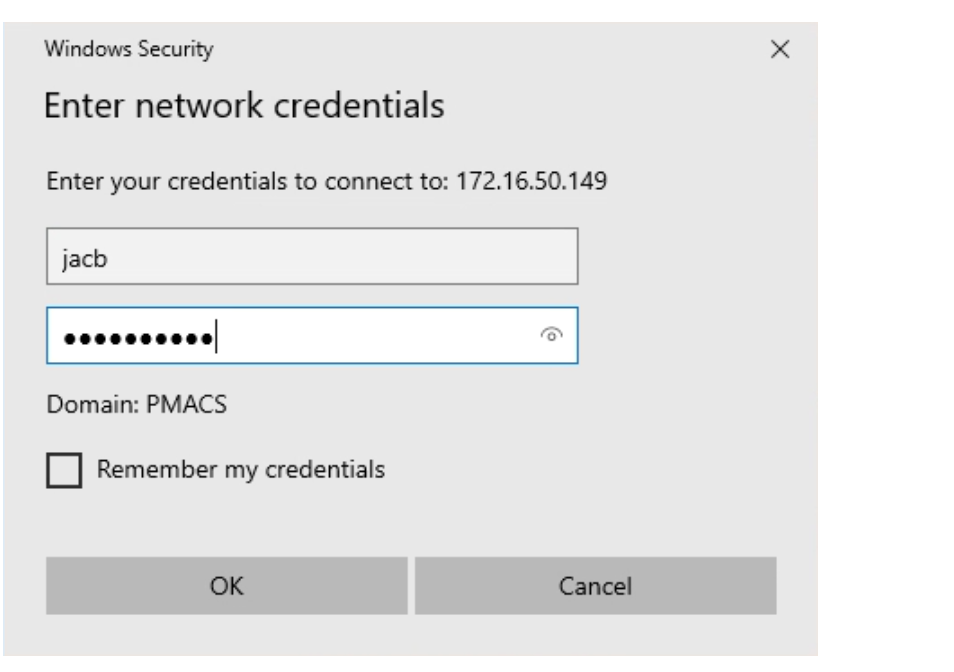
- When the login page pops up, put in your pmacs login:
- If the Domain does not say pmacs, then for your username put in pmacs\pennkey
- In the screenshot below, if the domain did not say PMACS then the username would have been: pmacs\jacb